Free tool. No sign up.

What is retyping paperwork costing you?

Invoices, claims, closing documents, timesheets, intake forms. If someone on your team reads them on one screen and types them into another, put in your own numbers and see what it adds up to over a year.

Runs in your browser. Nothing you type is sent or saved.

Your numbers

Your best guess is fine. The results update as you type.

Count everyone who does it, even for part of the day.
A normal week. An average is fine.
Is that for each person, or the whole team?
Open it, read it, type it, check it. Time one if you can.
Their pay plus what you pay on top, like payroll taxes and benefits. Use your own number.
Typos, missed fields, typed twice. Each fix counts as long as typing it the first time.

What it adds up to

Fill in the first three boxes to see your hours. Add your hourly cost to see the dollars.

Josh Bertrand

Bring these numbers to a free 15-minute call. I'll tell you straight how much of this a program could take off your team, and what should stay with a person.

Book a free 15-minute call

7 days a week, 9 AM to 6 PM Eastern. You deal with me, not a call center.

See it work

What a program like this looks like

A sample I built, reading 25 made-up invoices from a made-up supplier. Every name and number in these pictures is invented.

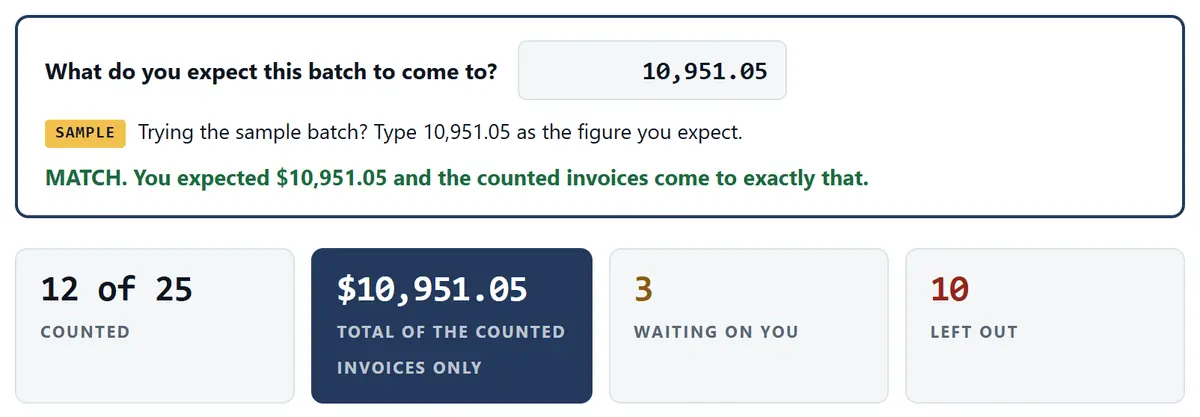
The sample after a made-up batch of 25 invoices: 12 of 25 counted, a total of $10,951.05, 3 waiting on you, 10 left out, and a match with the figure typed in first.

1. The whole week's batch goes in at once

25 made-up invoices, dropped in together. 12 are counted on their own, 3 wait for a person and 10 are left out, each with a reason. The total matches the figure typed in before the batch went in.

Open the full-size picture
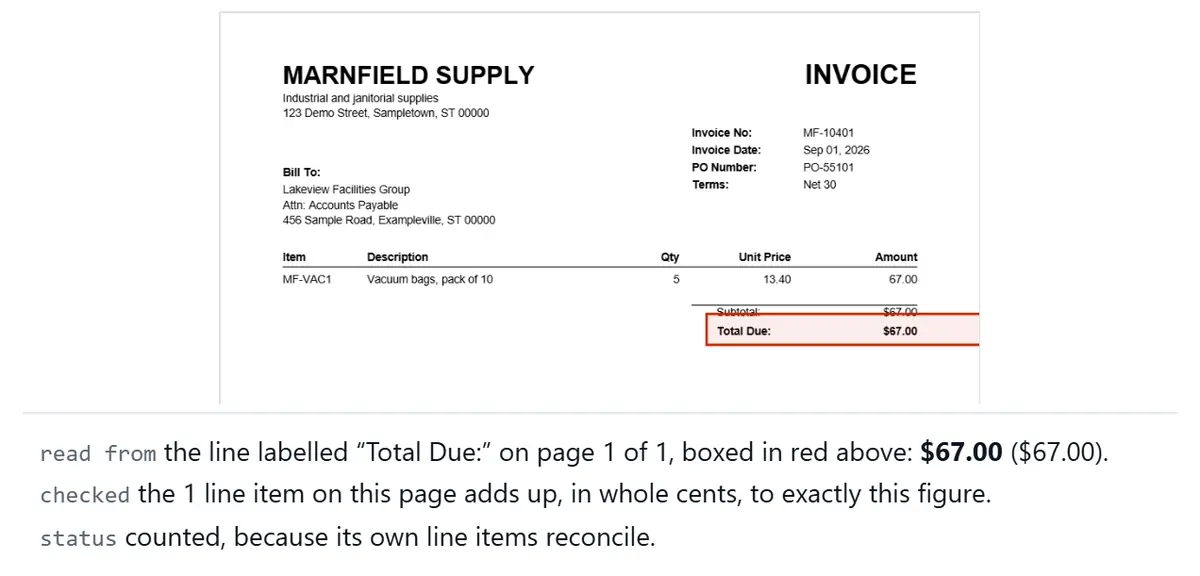
A made-up invoice with its Total Due line boxed in red. Under it, the sample says the one line item adds up to exactly $67.00, so it is counted.

2. It shows where every number came from

Open any invoice to see the line it read, boxed in red. It counts a figure on its own only when the invoice's own line items add up to it. The picture is trimmed to fit.

Open the full-size picture
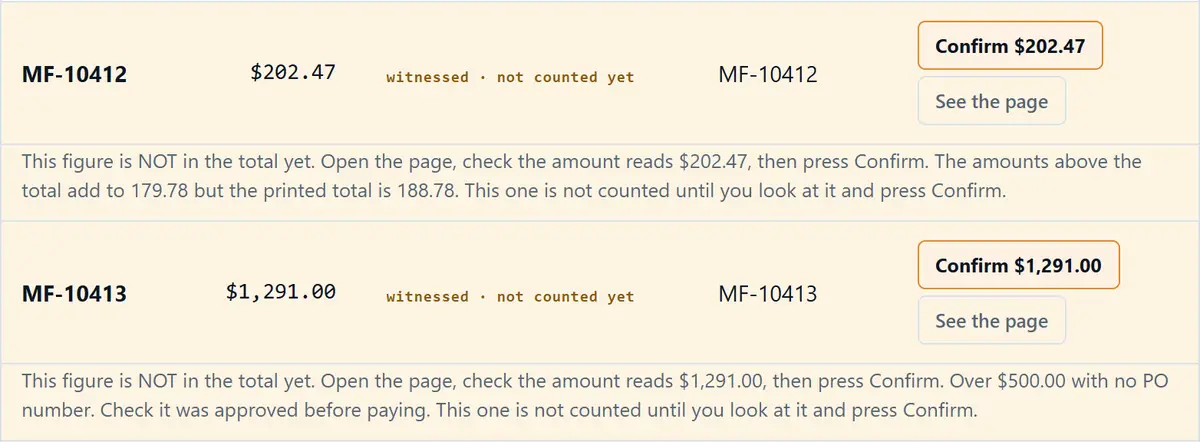
Two made-up invoices waiting for a person. On one, the sample read $202.47, but that invoice does not add up on its own page: the lines above its total come to 179.78 while the printed total says 188.78. The other is $1,291.00 with no PO number. Neither is counted until someone checks the page and presses Confirm.

3. Anything that looks off waits for a person

On the first one, the invoice doesn't add up on its own page. Its lines come to 179.78 but it prints 188.78, so the $202.47 the sample read needs a person to check it. The second is a big order with no PO number. Neither one is counted until someone looks at it and presses Confirm.

Open the full-size picture
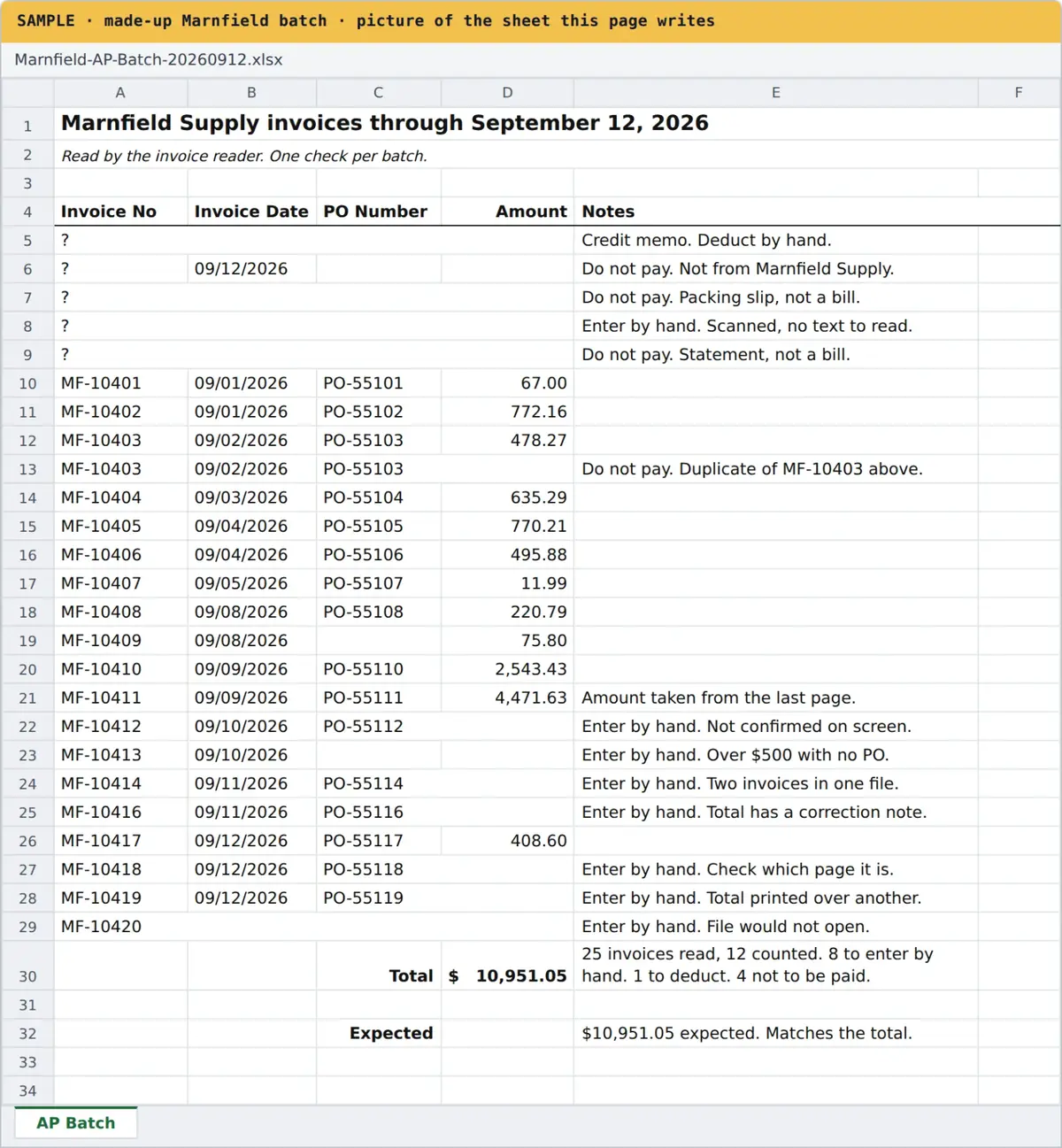
The spreadsheet the sample writes: invoice number, date, PO number and amount on each row, a short note on every row that needs a person, and the total at the bottom.

4. The spreadsheet comes out

It writes the same kind of sheet the team used to type by hand, with a short note on every row that needs attention. The sheet sorts the same 25 files a little differently: the 12 counted, 8 to enter by hand (the 3 nobody confirmed plus 5 of the left-out files), 1 credit to deduct and 4 not to pay.

Open the full-size picture

Want to click through it yourself, with the same made-up invoices?

Try the sample in the Showroom

A real project

A weekly pile of invoice PDFs, typed by a program instead of a person.

One of my clients is a workers' comp medical bill review company. Every week, someone there opened each invoice PDF and typed it into Excel by hand.

I built them a tool that reads the PDFs and builds the sheet. The first version was ready in about a day. They hired me for it. The sample above shows the same idea with made-up invoices.

Then I spent extra time throwing awkward invoices at it, like credit memos, duplicates and corrected totals, and fixed what I found. It isn't magic. It does the typing, and people still make the calls.

How this works

Simple math you can check by hand.

The math

  • Documents a week times minutes each gives minutes a week. If you picked "each person", we multiply by the number of people first.
  • Fixes count again. If 10 out of 100 need fixing, that adds 10% more time.
  • Divide by 60 for hours a week. Times 50 working weeks for hours a year.
  • Hours a year times your hourly cost gives the cost a year.
  • Hours a week divided by 40 shows how many full-time people that is.

What happens on the call

  1. Book 15 minutes.Pick a time that works for you, any day, 9 AM to 6 PM Eastern.
  2. Tell me what gets retyped.Bring one sample document if you can. Black out anything private.
  3. I tell you straight.If a program would help, you get a plan and a quote made for your business. If it wouldn't, I'll say so.

Questions

Good questions to ask.

Is what I type here sent anywhere?

No. The math runs in your own browser. The numbers you type aren't sent to me and aren't saved. Close the page and they're gone. Like most websites, the page does count visits.

What should I put for hourly cost?

Your own number. A common way is their hourly pay plus what you pay on top of it, like payroll taxes and benefits. I don't fill it in for you because every business is different.

Why 50 weeks and 40 hours?

50 working weeks leaves room for holidays and time off. 40 hours is one full-time week. They're round numbers so you can check the math yourself.

Will a program take this to zero?

Usually not. Someone still checks the odd ones. The call is to find out how much can come off your team's plate, and what that's worth to you.

What kinds of paperwork?

Anything your team reads on one screen and types into another: invoices, claims, closing documents, timesheets, intake forms and orders.

What about scanned paper or photos?

Documents that come out of another system as PDFs are the easiest. Scans and photos take an extra reading step. Bring one to the call and I'll tell you honestly what it would take.

What does it cost?

Every business gets its own plan and quote after a short call. The call is free.

Do you work outside Charlotte?

Yes. I work in person around Charlotte and remotely anywhere.

Josh Bertrand Founder, Alfred Sites · Custom programs and AI · Workflow Advisor

Bring your numbers. I'll tell you what I'd do.

15 minutes, free, with me personally.

Book a free 15-minute call

Rather talk now? Call or text (315) 807-3292